NSFAS 2027 Applications – Funding Dreams. Empowering Futures.

NSFAS 2027 Applications are now open!

Applications for 2027 funding open on 18 September 2026. Get your documents ready now.

00Days
00Hours
00Minutes
00Seconds

Time left before closure. Applications close on 31 October 2026
(South African time).

Smiling student holding a laptop and notebooks
Your futurestarts here.

NSFAS 2027 Applications

Apply from your phone,
wherever you are.

Create your myNSFAS profile, upload your documents and track your application — all from the official app. Applying is free.

Time left to apply
Applications open 18 September 2026 and close 31 October 2026 at 23:59 South African time. Apply now on myNSFAS
Get the app Download the NSFAS app on the App Store Get the NSFAS app on Google Play

Never pay anyone to apply. NSFAS will never ask for your password or OTP.

The myNSFAS app sign-in screen on a phone
On a computer? Scan to install
QR code linking to the NSFAS app on the App Store iOS
QR code linking to the NSFAS app on Google Play Android

NSFAS 2027 Applications

Marketing Material
Download Center

Access official NSFAS 2027 Applications campaign resources, applicant guides and support materials — ready to download, print and share.

Applications open
Applications close

Your future starts here.

Funding Dreams. Empowering Futures.

Official campaign resources

Everything you need. All in one place.

Use the filters to quickly find the right NSFAS 2027 Applications resource.

      How to apply

      It’s as easy as 1 · 2 · 3

      The whole application happens inside myNSFAS — on the app or in a browser. There is no fee at any stage, and no one needs to apply on your behalf.

      1. A student smiling at a library computer workstation

        Create a myNSFAS account

        Go to my.nsfas.org.za or open the NSFAS app. Your ID number is your username. An OTP is sent to activate your profile — never share it with anyone.

      2. A student working on a laptop at a library desk

        Apply and upload

        Select Apply, complete your personal and household details, then upload each document the system asks you for. PDF or JPEG, up to 20 MB each, clear and readable.

      3. Four students outdoors looking at a laptop screen together

        Submit and track

        Review everything, submit, and save your reference number. Then open the Tracker in myNSFAS to follow your status — you have 30 working days to answer any request for more information.

      Every applicant

      One form is required from everyone, no exceptions.

      • A signed NSFAS consent formThis lets NSFAS verify your household income.

      Your list is personalised. myNSFAS generates the exact documents you need from your application type — upload what it asks for, and nothing else. If you receive a SASSA grant, no proof of income is required.

      Only if it applies to you

      The portal will tell you which of these it needs.

      • Disability Annexure A formFor students with disabilities. Available on the NSFAS website.
      • Vulnerable Child Declaration formFor applicants under 18, completed by a social worker.
      • NSFAS Declaration formIf you are under 35 and the people you declared do not match Home Affairs records — most often with legal guardians.
      • ID copies of your parent(s) or guardianOnly if their details differ from Home Affairs records.
      • SARS ITA34Only if you appeal your financial eligibility.

      NSFAS 2027 Applications

      Ready to apply?

      Applications for the 2027 academic year are open from 18 September to 31 October 2026. Applying is free, and you can start on your phone and finish later — myNSFAS saves your progress as you go.

      Apply now on myNSFAS
      Apply on myNSFAS
      18 Sep – 31 Oct 2026
      Toll-free
      0800 067 327

      Media briefing on the 2027 applications opening date

      Minister of Higher Education and Training Mr Buti Manamela announces the opening of NSFAS 2027 applications and the readiness of our universities, TVET & CET colleges for the 2027 academic year.

      Date
      Friday, 18 September 2026
      Time
      10:00 (SAST)

      The stream starts on Friday, 18 September at 10:00.

      Livestream link:

      Media briefing poster: Minister Buti Manamela, 10am, Friday 18 September 2026, NSFAS 2027 Applications
      Mr Buti ManamelaMinister of Higher Education and Training
      18 Sep 2026The 2027 application season opens
      Free to applyNSFAS never charges a fee to apply
      myNSFASApply online or on the NSFAS Student App

      Get ready before applications open

      Four things you can do this week so your application goes through without delays.

      1. Create your myNSFAS account

        Register with your ID number, a working email address and your own cellphone number.

      2. Gather your documents

        Use the checklist below. Scan or photograph each document clearly so it is easy to read.

      3. Check your details

        Make sure your name and ID match your Home Affairs record exactly.

      4. Apply on opening day

        Complete your profile, upload your documents and submit. Then track your status on myNSFAS.

      Supporting documents checklist

      Tick each document off as you get it ready. Your ticks are saved on this device.

      0 of 13 ready

      Identity informationRequired
      Parent or legal guardian informationRequired
      Consent requirementsRequired
      Disability supporting documentsMay be required
      Vulnerable child declarationMay be required
      Apply on myNSFAS
      Applications open

      Supporting documents for NSFAS 2027

      Your application is only assessed once every required document has been received and is readable. Download the correct forms below, sign them in black ink, and upload them to your myNSFAS account before the closing date.

      2027 application cycle

      Opened
      18 September 2026
      Closes
      31 October 2026
      To submit missing documents
      30 working days
      Step 1 — Download

      Official NSFAS 2027 Supporting document forms

      Print each form that applies to you, complete it by hand and scan it back in. The system generates your own document list based on your application type — always check myNSFAS for what it has asked you for.

      Page one of the NSFAS 2027 Consent Form, showing the applicant ID number block and the parent, guardian and spouse signature sections.
      Required by everyone FORM APP2027

      NSFAS 2027 Consent Form

      Gives NSFAS permission to verify your identity, household and income against third-party sources including SARS and the Department of Home Affairs. Signed by the applicant and by every parent, legal guardian or spouse whose details appear on the application. Without it, your application cannot be submitted.

      • Capital letters only
      • Black ink
      • No electronic signatures
      • No correction fluid
      • 1 page

      Disability Annexure Form

      For applicants living with a disability. A registered medical practitioner completes and signs it. Merge the medical report into the same file as the annexure before you upload — separate files are returned.

      Raises the household income threshold to R600 000.

      Download form

      Orphan or Vulnerable Child Declaration

      Completed only by applicants under the age of 18 who are orphans, or who are vulnerable children in the terms set out on the form.

      Replaces parent or guardian income details where no parent or guardian can sign.

      Download form

      NSFAS Declaration Form

      Applies to applicants aged 34 and younger. It is used to verify the parent or legal guardian details captured on your application.

      Often confused with the consent form — most applicants under 34 submit both.

      Download form
      Step 2 — Gather

      Documents that depend on your situation

      Only upload what applies to your household.

      Supporting documents by circumstance, NSFAS 2027 applications.
      If this applies to you Upload this Copy
      Every applicant South African ID or birth certificate (Smart ID card: both sides) Yes
      A parent, legal guardian or spouse earns an income Payslips for the last three months, or a UIF statement, or an affidavit where the income is informal Not required
      Someone in the household receives a SASSA grant Nothing — Child Support, Foster Child and Care Dependency grants are verified with SASSA automatically Not required
      A parent or guardian has died Death certificate for each deceased parent or guardian Yes
      Your parents are divorced or separated Divorce decree, or the settlement agreement showing maintenance Yes
      You are married, or a spouse signs for you Marriage certificate, plus your spouse's ID Yes
      You live with a legal guardian Proof of legal guardianship issued by a court Yes
      A parent or legal guardian was retrenched Retrenchment letter from the employer — also accepted as supporting evidence in an appeal Not required
      Step 3 — Upload

      Preparing a file that passes first time

      1. 01

        Sign it by hand

        Print, complete in capital letters using black ink, and sign. Typed or pasted signatures are rejected. Any correction is initialled by every party who signed.

      2. 02

        Scan the whole page/s

        Capture every edge of the document in good light. Cropped corners, shadows and blurred ID numbers are the most common reason a document is sent back.

      3. 03

        Merge into one file

        Multi-page documents go up as a single file — both pages of the declaration form together, and the medical report merged with the disability annexure.

      4. 04

        Upload to the right slot

        Each requested document has its own slot in myNSFAS portal. Upload it there, then check that the status changes before you leave the page.

      NSFAS will never ask you to pay for an application or share your password

      Apply only through the official myNSFAS portal or the NSFAS mobile application. Ignore WhatsApp forwards, social media accounts and agents offering to speed up your application or upload documents on your behalf. Report anything suspicious to the toll free line on 0800 067 327 or email us at speakup@nsfas.org.za.

      Leadership Announcement

      Message to the Members of the General Council


      Dear Members of the General Council,

      Compliments of the New Year.

      The National Student Financial Aid Scheme (NSFAS) notes with appreciation the announcement regarding the leadership developments within the Association of African Higher Education Financing Agencies (AAHEFA).

      NSFAS congratulates Dr Dennis Khasu on his assumption of the Office of Vice President of AAHEFA, following his appointment as Chief Executive Officer of the Higher Education Loans and Grants Board (HELGB). We are confident that his leadership and experience will make a valuable contribution to advancing AAHEFA’s mandate and strengthening collaboration among higher education financing agencies across the continent.

      We further extend our congratulations to Mr Zephania Maduhu on his appointment as Chief Executive Officer of AAHEFA, following his period of service as Acting CEO. His formal appointment is a testament to his leadership and commitment to the organisation.

      NSFAS wishes both appointees every success in their respective roles and looks forward to continued collaboration in support of higher education financing in Africa.

      Yours sincerely,
      National Student Financial Aid Scheme (NSFAS)

      NSFAS 2026 Applications
      Funding outcomes communicated from 15 December 2025

      Missing Documents Appeals

      Log in to your myNSFAS account and keep your application on track.

      To ensure that your 2026 funding application can be fully processed, applicants are urged to log in regularly to their myNSFAS portal and check for any notifications about missing documents.

      As NSFAS continues to assess funding applications, students who still need to upload specific supporting documents will be notified via their portal. Once a notice is issued, you will have 30 days to upload the required documents.

      Submit all missing documents within 30 days

      Failure to upload the requested documents within the allocated period will result in your application being marked as incomplete and it will not be considered for funding.

      Assessment & funding outcomes

      NSFAS remains committed to finalising the assessment of all applications and releasing funding outcomes from 15 December 2025.

      Please continue to monitor your myNSFAS account for any updates changes to your application status.

      Cybersecurity Announcement

      Systems Security Advisory

      NSFAS was recently alerted to a potential security weakness within certain components of its ICT systems. Upon identification, NSFAS immediately activated its information security and incident management protocols, prioritised the matter, and implemented remedial measures without delay.

      Actions taken include strengthening access controls, reviewing system permissions, and enhancing monitoring across affected environments. At this stage, there is no indication of an ongoing system compromise.

      NSFAS remains committed to transparency and compliance with the Protection of Personal Information Act (POPIA). This advisory is issued to inform users of the incident and the steps taken to secure NSFAS systems. Direct communication will be undertaken where required, based on verified risk and regulatory guidance.

      NSFAS continues to strengthen its cybersecurity environment to protect the personal information of students and stakeholders.

      Users are encouraged to remain vigilant, protect their login credentials, and report any suspicious activity via official NSFAS communication channels.

      Enhanced Access Controls

      User permissions and system access have been reviewed and reinforced across affected environments.

      Continuous Monitoring

      Advanced monitoring has been implemented to detect and respond to potential threats in real time.

      POPIA Compliance

      NSFAS remains committed to lawful, transparent, and responsible handling of personal information.

      2025/2026 Strategic Focus

      ARISE Values

      Accountability • Respect • Integrity • Social Justice • Excellence

      ARISE Valies


      Department Logo


      🎉 Welcome!


      Congratulations to Honourable Mr. Buti Manamela
      on your appointment as Minister of Higher Education & Training,
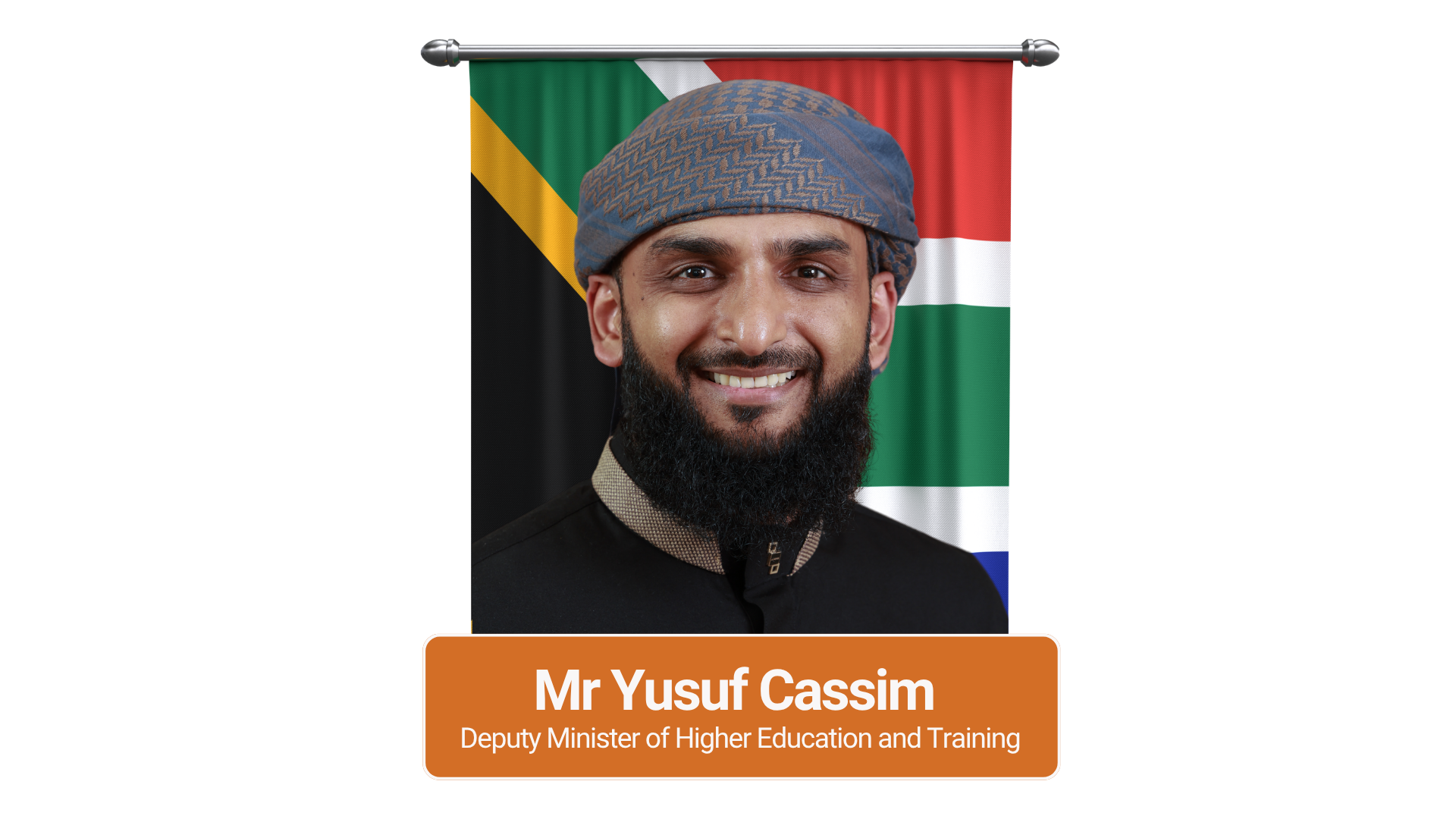
      and to Dr. Nomusa Dube-Ncube and Mr Yusuf Cassim as Deputy Minister of Higher Education & Training.


      Together, we look forward to advancing inclusive access to quality education and student funding in South Africa.

      Dr. Nomusa Dube-Ncube - Deputy Minister of Higher Education and Training
      Mr. Buti Manamela - Minister of Higher Education and Training
      Mr. Yusuf Cassim - Deputy Minister of Higher Education and Training

      Important Notice for NSFAS Beneficiaries


      NSFAS beneficiaries are not required to pay any fees for student accommodation. Any accommodation provider charging such fees, or engaging in gender-based violence or sexual harassment, will be held accountable for this fraudulent and unethical behavior.

      We encourage all stakeholders to report these unethical practices to our fraud prevention hotline at

      speakup@nsfas.org.za

      Student Accommodation

      Calling all student accommodation providers: Join us in providing quality housing for NSFAS students.

      Register Your Property

      How to Apply and Reserve Student Accommodation for NSFAS beneficiaries

      Follow these steps to secure accommodation as an NSFAS beneficiary, provisional funded applicant, whom registered at a University or TVET college for the 2026 academic year.

      Step 1: Log In

      Visit the myNSFAS portal and log in using your student credentials.

      Step 2: Search for Accommodation

      Browse the list of approved student accommodations near your institution.

      Step 3: Apply

      Choose your preferred accommodation and complete the application form.

      Step 4: Confirmation

      Receive an email or SMS confirming your accommodation reservation.

      Click here to Secure my Accommodation Now
      Student Accommodation Process

      Step-by-Step for Student Accommodation Registration Guide for Accommodation Providers

      Step 1: Create an Account

      Sign up on the Accommodation Provider Application portal to start your journey.

      Step 2: Add Property Details

      Provide information about your property for verification.

      Step 3: Upload Documents

      Submit required documentation, such as proof of ownership and pay for the number of beds you are registering.

      Step 4: Get Inspected & Graded

      Compliance with the minimum norms and standard for student housing.

      Why Partner with NSFAS?

      NSFAS offers a three-year contract with annual reviews for all registered accommodation providers.

      Icon
      Guaranteed Income

      Receive steady rental payments for NSFAS-funded students.

      Icon
      Empower Education

      Provide housing and help students focus on their education.

      Icon
      Easy Registration

      Simple and straightforward registration and accreditation process.

      Join the NSFAS Network

      Provide quality accommodation to students while earning steady rental income.

      Register Now

      NSFAS Documents Download

      Click the buttons below to download the PDF documents for the NSFAS eligibility criteria and conditions for financial aid for 2026 Academic Year.


      NSFAS has a ZERO-TOLERANCE POLICY towards dishonesty, bribery, fraud and corruption!


      • Behonest Hotline

        You can submit a report on fraud, bribery, corruption or unethical behaviour by sending an email to speakup@nsfas.org.za


      • No_bribery

        IF YOU DO NOT REPORT IT, YOU SUPPORT IT!!!


      Appeals
      Rejected applicants who are eligible to appeal may appeal their application outcome within 30 days of receiving their application results.

      Email Account
      Need help creating an email address?

      Click here

      NSFAS 2027 Applications Supporting documents
      If you have applied for #NSFAS 2027 funding and received a request to submit supporting documents, log into your myNSFAS account to upload the required documents.

      NSFAS 2027 Orphan or Vulnerable Child declaration form
      NSFAS 2027 Application Consent form
      NSFAS 2027 Application Declaration form
      NSFAS 2027 Disability Annexure form

      Let's chat
      Need help applying? chat to us on.


      Media Statements


      Listen to what’s hot regarding the latest NSFAS 2026 podcast


      NSFAS stories:


      The higher education sector gets new leadership
      Mr Buti Manamela is the newly appointed Minister of Higher Education and Training by President Cyril Ramaphosa.


      The higher education sector gets new leadership

      The higher education sector gets new leadership

      Eleven days after being inaugurated as the president of the Republic Of South Africa, Mr. Cyril Ramaphosa, announced his Cabinet on Sunday evening, June 30, 2024.The National Student Financial Aid Scheme will now report under a new Ministry, that of Higher Education, and Training led by Dr Nobuhle Nkabane and Deputy Ministers, Mr Buti Manamela and Dr Mimmy Gondwe.


      NSFAS Board Chair condemns the intentional misrepresentation of the SIU report.
      NSFAS Board Chair condemns the intentional misrepresentation of the SIU report.

      In an interview with ENCA this morning, Mr Khosa condemned media reporting that suggests the fraudulent transactions are still proceeding.

      This is history. We have since established systems that would eliminate such activities, He reminded viewers that the period in question is 2018-2021 and has no relevance to the current situation wherein systems have been radically improved, and measures have been put in place to prevent such errors.

      The NSFAS Board wishes to reassure all stakeholders that the current systems have eliminated the prevalence of these fraudulent activities .


      Who qualifies for the Bursary? You qualify for a NSFAS bursary if you are a South African citizen who plans to study in 2026 or you are already studying at a public university or TVET college Click here to read more


      Who qualifies for the Bursary?

      You qualify for a NSFAS bursary if you are a South African citizen who plans to study in 2026 or you are already studying at a public university or TVET college and you meet the following requirements:
      • SASSA recipients automatically qualify on financial eligibility
      • Your combined household income is not more than R350 000 per year or
      • Person with a disability with a combined household income of not more than R600 000 per year or
      • Must have email and cell phone number

      How to create your myNSFAS acccount? Click here to read more


      Get started by creating a new account.

      It’s as easy as 1,2,3,……

      1. Type in first names (as per ID number)
      2. Type in Surname (as per ID number)
      3. Type in your ID number (will your username)
      4. Type in your own Email address
      5. Type in your own Cellphone number
      6. Accept terms and conditions Tick the box provided, to allow NSFAS to check the information provided (compulsory)
      7. Create a Password, To (protect your account)

      ID number, Names and Surname is validated against the Department of Home Affairs database. Only valid South African ID information will be accepted.